CSS3 渐变颜色 -webkit-linear-gradient
原文地址:http://www.cnblogs.com/lhb25/archive/2013/01/30/css3-linear-gradient.html
本文照常忽略IE不管,我们主要看看在 Mozilla、Webkit、Opera 下的应用,当然在 IE 下也可以实现,他需要通过 IE 特有的滤镜来实现,在后面会列出滤镜的使用语法,但不会具体介绍如何实用,感兴趣的可以搜索相关技术文档。
一、线性渐变在 Mozilla 下的应用
语法:
|
1 |
-moz-linear-gradient( [<point> || <angle>,]? <stop>, <stop> [, <stop>]* ) |

HTML:
|
1 |
<div class="example example1"></div> |
|
1
2
3
4 |
.example { width: 150px; height: 80px; } |
现在我们给这个div应用一个简单的渐变样式:
|
1
2
3 |
.example1 { background: -moz-linear-gradient( top,#ccc,#000);} |

二、线性渐变在 Webkit 下的应用
语法:
|
1
2 |
-webkit-linear-gradient( [<point> || <angle>,]? <stop>, <stop> [, <stop>]* )//最新发布书写语法-webkit-gradient(<type>, <point> [, <radius>]?, <point> [, <radius>]? [, <stop>]*) //老式语法书写规则 |


|
1 |
background: -webkit-gradient(linear,center top,center bottom,from(#ccc), to(#000)); |
接着我们在来看一下新式的写法:
|
1 |
-webkit-linear-gradient(top,#ccc,#000); |
三、线性渐变在 Opera 下的应用
语法:
|
1 |
-o-linear-gradient([<point> || <angle>,]? <stop>, <stop> [, <stop>]); /* Opera 11.10+ */ |

|
1 |
background: -o-linear-gradient(top,#ccc, #000); |
四、线性渐变在 Trident (IE) 下的应用
语法:
|
1
2 |
filter: progid:DXImageTransform.Microsoft.gradient(GradientType=0, startColorstr=#1471da, endColorstr=#1C85FB);/*IE<9>*/-ms-filter: "progid:DXImageTransform.Microsoft.gradient (GradientType=0, startColorstr=#1471da, endColorstr=#1C85FB)";/*IE8+*/ |

从上面的语法中我们可以很清楚的知道,要创建一个线性渐变,我们需要创建一个起点和一个渐变方向(或角度),定义一个起始色:
|
1
2
3 |
-moz-linear-gradient( [<point> || <angle>,]? <stop>, <stop> [, <stop>]* )-webkit-linear-gradient( [<point> || <angle>,]? <stop>, <stop> [, <stop>]* )-o-linear-gradient( [<point> || <angle>,]? <stop>, <stop> [, <stop>]* ) |
|
1
2
3
4 |
background:-moz-linear-gradient(left,#ace,#f96);/*Mozilla*/background:-webkit-gradient(linear,0 50%,100% 50%,from(#ace),to(#f96));/*Old gradient for webkit*/background:-webkit-linear-gradient(left,#ace,#f96);/*new gradient for Webkit*/background:-o-linear-gradient(left,#ace,#f96); /*Opera11*/ |

起始点(Starting Point)的工作方式类似于 background position。您可以设置水平和垂直位置为百分比,或以像素为单位,或在水平方向上可以使用left/center/right,在垂直方向上可以使用top/center/bottom。位置起始于左上角。如果你不指定水平或垂直位置,它将默认为center。其工作方式主要包含:Top → Bottom、Left → Right、bottom → top、right → left等,接着我们主要一种一种来看其实现的效果:
1、开始于center(水平方向)和top(垂直方向)也就是Top → Bottom:
|
1
2
3
4
5
6
7
8
9 |
/* Firefox 3.6+ */background: -moz-linear-gradient(top, #ace, #f96);/* Safari 4-5, Chrome 1-9 *//* -webkit-gradient(, [, ]?, [, ]? [, ]*) */background: -webkit-gradient(linear,top,from(#ace),to(#f96));/* Safari 5.1+, Chrome 10+ */background: -webkit-linear-gradient(top, #ace, #f96);/* Opera 11.10+ */background: -o-linear-gradient(top, #ace, #f96); |

2、始于left(水平方向)和center(垂直方向)也是就Left → Right:
|
1
2
3
4
5
6 |
/* Firefox 3.6+ */background: -moz-linear-gradient(left, #ace, #f96);/* Safari 5.1+, Chrome 10+ */background: -webkit-linear-gradient(left, #ace, #f96);/* Opera 11.10+ */background: -o-linear-gradient(left, #ace, #f96); |

3、起始于left(水平方向)和top(垂直方向):
|
1
2
3 |
background: -moz-linear-gradient(left top, #ace, #f96);background: -webkit-linear-gradient(left top, #ace, #f96);background: -o-linear-gradient(left top, #ace, #f96); |

4、Linear Gradient (with Even Stops):
|
1
2
3
4
5
6
7
8 |
/* Firefox 3.6+ */background: -moz-linear-gradient(left, #ace, #f96, #ace, #f96, #ace);/* Safari 4-5, Chrome 1-9 */background: -webkit-gradient(linear, left top, right top, from(#ace), color-stop(0.25, #f96), color-stop(0.5, #ace), color-stop(0.75, #f96), to(#ace));/* Safari 5.1+, Chrome 10+ */background: -webkit-linear-gradient(left, #ace, #f96, #ace, #f96, #ace);/* Opera 11.10+ */background: -o-linear-gradient(left, #ace, #f96, #ace, #f96, #ace); |

5、with Specified Arbitrary Stops:
|
1
2
3
4
5
6
7
8 |
/* Firefox 3.6+ */ background: -moz-linear-gradient(left, #ace, #f96 5%, #ace, #f96 95%, #ace); /* Safari 4-5, Chrome 1-9 */ background: -webkit-gradient(linear, left top, right top, from(#ace), color-stop(0.05, #f96), color-stop(0.5, #ace), color-stop(0.95, #f96), to(#ace)); /* Safari 5.1+, Chrome 10+ */ background: -webkit-linear-gradient(left, #ace, #f96 5%, #ace, #f96 95%, #ace); /* Opera 11.10+ */ background: -o-linear-gradient(left, #ace, #f96 5%, #ace, #f96 95%, #ace); |
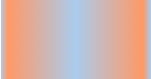
6、角度(Angle):
正如上面看到的示例,如果您不指定一个角度,它会根据起始位置自动定义。如果你想更多的控制渐变的方向,您不妨设置角度试试。例如,下面的两个渐变具有相同的起点left center,但是加上一个30度的角度。
没有角度的示例代码:
|
1
2
3 |
background: -moz-linear-gradient(left, #ace, #f96);background: -webkit-linear-gradient(left,#ace,#f96);background: -o-linear-gradient(left, #ace, #f96); |
|
1
2
3 |
background: -moz-linear-gradient(left 30deg, #ace, #f96);background: -webkit-gradient(linear, 0 0, 100% 100%, from(#ace),to(#f96));background: -o-linear-gradient(30deg, #ace, #f96); |


当指定的角度,请记住,它是一个由水平线与渐变线产生的的角度,逆时针方向。因此,使用0deg将产生一个左到右横向梯度,而90度将创建一个从底部到顶部的垂直渐变。我来看看你核心代码:
|
1
2
3
4 |
background: -moz-linear-gradient(<angle>, #ace, #f96);background: -webkit-gradient(<type>,<angle>, from(#ace), to(#f96));background: -webkit-linear-gradient(<angle>, #ace, #f96);background: -o-linear-gradient(<angle>, #ace, #f96); |
|
1
2
3
4
5
6
7
8
9
10
11
12
13
14
15
16
17
18
19
20
21
22
23
24
25
26
27
28
29
30
31
32
33
34
35
36
37
38
39
40
41
42
43
44
45
46
47
48
49
50
51
52
53
54
55 |
.deg0 { background: -moz-linear-gradient(0deg, #ace, #f96); background: -webkit-gradient(linear,0 50%,100% 50%,from(#ace),to(#f96)); background: -webkit-linear-gradient(0deg, #ace, #f96); background: -o-linear-gradient(0deg, #ace, #f96);} .deg45 { background: -moz-linear-gradient(45deg, #ace, #f96); background: -webkit-gradient(linear,0 100%,100% 0%,from(#ace),to(#f96)); background: -webkit-linear-gradient(45deg, #ace, #f96); background: -o-linear-gradient(45deg, #ace, #f96);}.deg90 { background: -moz-linear-gradient(90deg, #ace, #f96); background: -webkit-gradient(linear,50% 100%,50% 0%,from(#ace),to(#f96)); background: -webkit-linear-gradient(90deg, #ace, #f96); background: -o-linear-gradient(90deg, #ace, #f96);}.deg135 { background: -moz-linear-gradient(135deg, #ace, #f96); background: -webkit-gradient(linear,100% 100%,0 0,from(#ace),to(#f96)); background: -webkit-linear-gradient(135deg, #ace, #f96); background: -o-linear-gradient(135deg, #ace, #f96);}.deg180 { background: -moz-linear-gradient(180deg, #ace, #f96); background: -webkit-gradient(linear,100% 50%,0 50%,from(#ace),to(#f96)); background: -webkit-linear-gradient(180deg, #ace, #f96); background: -o-linear-gradient(180deg, #ace, #f96);}.deg225 { background: -moz-linear-gradient(225deg, #ace, #f96); background: -webkit-gradient(linear,100% 0%,0 100%,from(#ace),to(#f96)); background: -webkit-linear-gradient(225deg, #ace, #f96); background: -o-linear-gradient(225deg, #ace, #f96);}.deg270 { background: -moz-linear-gradient(270deg, #ace, #f96); background: -webkit-gradient(linear,50% 0%,50% 100%,from(#ace),to(#f96)); background: -webkit-linear-gradient(270deg, #ace, #f96); background: -o-linear-gradient(270deg, #ace, #f96);}.deg315 { background: -moz-linear-gradient(315deg, #ace, #f96); background: -webkit-gradient(linear,0% 0%,100% 100%,from(#ace),to(#f96)); background: -webkit-linear-gradient(315deg, #ace, #f96); background: -o-linear-gradient(315deg, #ace, #f96);}.deg360 { background: -moz-linear-gradient(360deg, #ace, #f96); background: -webkit-gradient(linear,0 50%,100% 50%,from(#ace),to(#f96)); background: -webkit-linear-gradient(360deg, #ace, #f96); background: -o-linear-gradient(360deg, #ace, #f96);} |

除了起始位置和角度,你应该指定起止颜色。起止颜色是沿着渐变线,将会在指定位置(以百分比或长度设定)含有指定颜色的点。色彩的起止数是无限的。如果您使用一个百分比位置,0%代表起点和100%是终点,但区域外的值可以被用来达到预期的效果。 这也是通过CSS3 Gradient制作渐变的一个关键所在,其直接影响了你的设计效果,像我们这里的示例都不是完美的效果,只是为了能给大家展示一个渐变的效果,大家就这样先用着吧。我们接着看一下不同的起址色的示例:
|
1
2
3 |
background: -moz-linear-gradient(top, #ace, #f96 80%, #f96);background: -webkit-linear-gradient(top,#ace,#f96 80%,#f96);background: -o-linear-gradient(top, #ace, #f96 80%, #f96); |

如果没有指定位置,颜色会均匀分布。如下面的示例:
|
1
2
3 |
background: -moz-linear-gradient(left, red, #f96, yellow, green, #ace);background: -webkit-linear-gradient(left,red,#f96,yellow,green,#ace);background: -o-linear-gradient(left, red, #f96, yellow, green, #ace); |

7、渐变上应用透明度(Transparency):
透明渐变对于制作一些特殊的效果是相当有用的,例如,当堆叠多个背景时。这里是两个背景的结合:一张图片,一个白色到透明的线性渐变。我们来看一个官网的示例吧:
|
1
2
3 |
background: -moz-linear-gradient(right, rgba(255,255,255,0), rgba(255,255,255,1)),url(http://demos.hacks.mozilla.org/openweb/resources/images/patterns/flowers-pattern.jpg);background: -webkit-linear-gradient(right, rgba(255,255,255,0), rgba(255,255,255,1)),url(http://demos.hacks.mozilla.org/openweb/resources/images/patterns/flowers-pattern.jpg);background: -o-linear-gradient(right, rgba(255,255,255, 数据加载中 |
